
Lead Scraper Chrome extension for B2B prospecting
AI Tools

Lead Scraper Chrome Extension.

Chrome extension that exports every visible Google Maps business listing — name, phone, email, website, rating — to a spreadsheet in one click. Zero API keys, zero setup, zero learning curve.

Chrome Extension APIManifest V3JavaScriptGoogle Maps DOM
Scroll to explore
10 seconds

Time to Export

7 per lead

Data Points

None

Setup Required

Lead Scraper Chrome Extension
(How We Built It)
01

Challenge

Agency owners and freelancers already browse Google Maps to find prospects. But extracting that data — name, phone, email, website, rating, review count, address — requires hours of clicking, copying, and pasting into a spreadsheet. The data is right there on screen. Getting it out is the bottleneck.

02

Approach

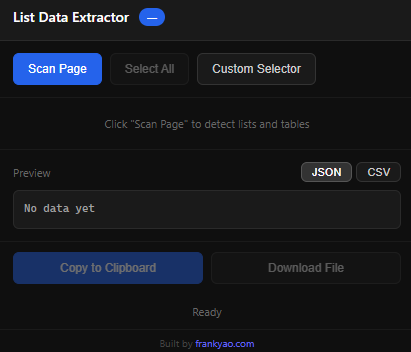
Built a Chrome extension that reads the visible Google Maps business listings directly from the DOM. One click captures every listing on screen and exports to CSV or Excel. No API keys, no authentication, no configuration. It works inside the existing Google Maps workflow — search, click, export.

03

Results

What takes 4 hours of manual prospecting now takes 10 seconds. Users search Google Maps as they normally would, click the extension, and get a complete lead list exported and ready for CRM import or cold outreach. The extension has become the default prospecting tool for several agency sales teams.

(Screenshots)
Lead Scraper Chrome Extension screenshot 1
Lead Scraper Chrome Extension

The full story behind Lead Scraper Chrome Extension.

(Case Study)
01

The simplest prospecting tool you will ever use

Most lead generation tools require setup. API keys, account creation, learning a new interface, configuring search parameters. By the time you are running your first search, you have spent thirty minutes on onboarding.

This Chrome extension takes ten seconds. Install it. Open Google Maps. Search for your niche in your target city. Click the extension icon. Every visible business listing is captured and exported to a spreadsheet.

The data extracted includes business name, phone number, email address (when available on the listing), website URL, Google star rating, total review count, and full address. Seven data points per lead, formatted and ready for import into any CRM, mail merge tool, or outreach platform.

There is no monthly subscription. No per-search fee. No rate limiting. No API quota to manage. The extension reads what Google Maps is already showing you on screen and packages it into a usable format. The value proposition is not access to data — the data is already visible. The value is eliminating the manual extraction step that turns a five-minute browse into a four-hour data entry session.

02

Built for the way agencies actually prospect

The design principle was zero friction. Every feature decision was filtered through one question: does this add a step?

The extension activates only on Google Maps pages. It detects the current search results and shows a count of extractable listings. One click starts the export. The file downloads automatically. No modal dialogs. No configuration screens. No settings to adjust.

The CSV export is formatted for immediate use. Column headers match common CRM import templates. Phone numbers are cleaned and standardized. Email addresses are validated. Addresses are split into components when possible.

For agency sales teams that prospect weekly, the cumulative time savings are significant. A team that builds three prospect lists per week at four hours each recovers twelve hours of selling time. Over a quarter, that is over a hundred and fifty hours redirected from data entry to actual outreach and relationship building.

The extension pairs naturally with OpportunityFinder for teams that want deeper website quality scoring and automated email extraction. Use the Chrome extension for quick daily prospecting. Use OpportunityFinder for comprehensive niche research with quality scoring. Together, they cover the full prospecting spectrum from casual browse to systematic campaign.

Want Something Like This?

Every project starts with a conversation. Tell me the problem — I'll show you the system that solves it.